
The SEO dashboard that keeps every source in one place
Live rank tracking, keyword research and a Google Search Console archive that outlives Google's sixteen months, on one set of charts.
Free during the pilot. No card. Your data stays yours.
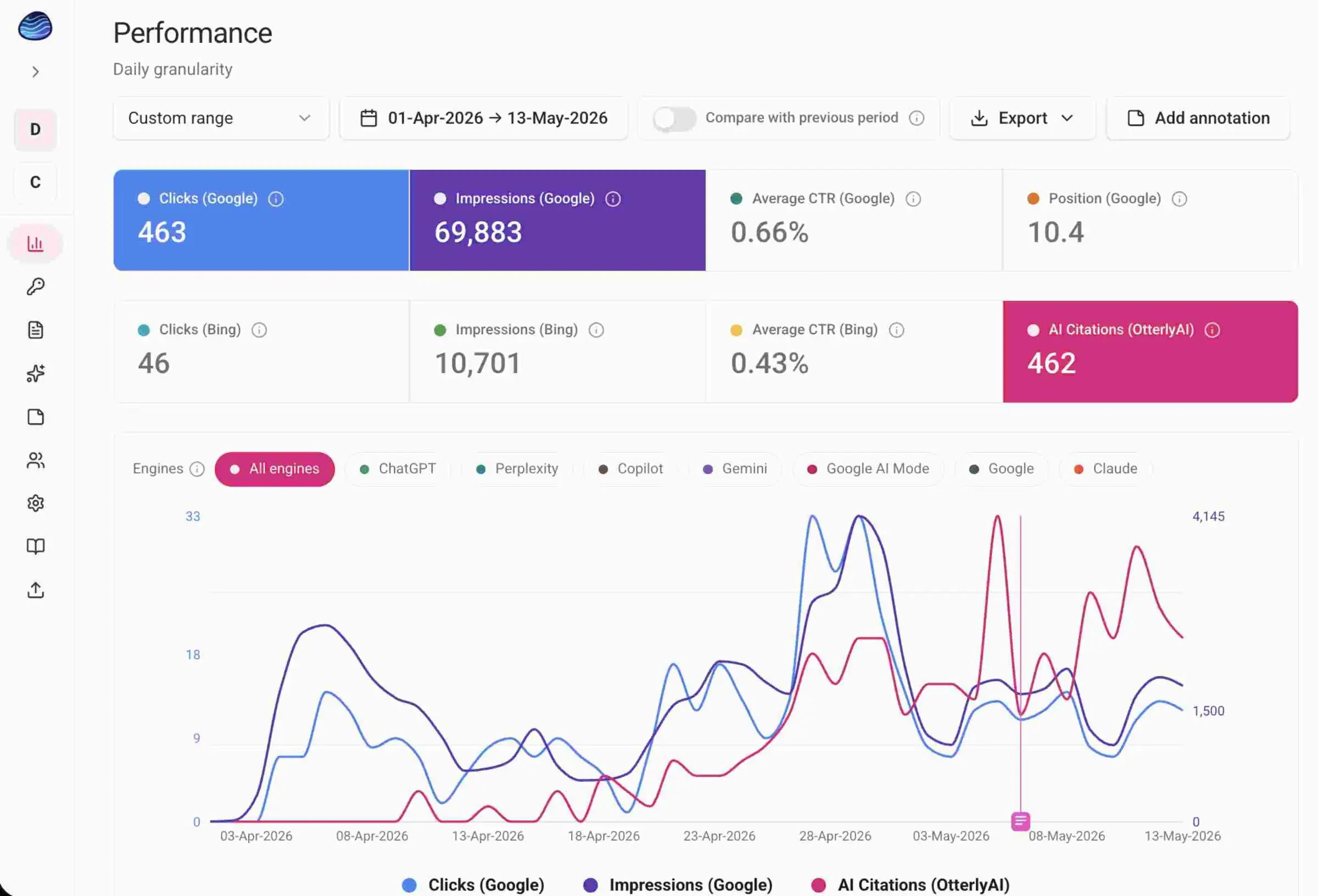
One SEO dashboard, six sources
An SEO dashboard is only as good as what feeds it, so all six sources land on the same charts.
Rank tracker
Live SERP checks on the keywords you choose, with the top twenty results stored and the AI Overview recorded every time.
Keyword research
One seed returns up to a hundred ideas with volume, difficulty, CPC and intent. Tick the good ones and they are tracked.
Search Console archive
Connect Google, run one backfill, and every month after that is yours permanently.
AI search visibility
Which engines cite you, for which prompts, and whether the AI Overview on your keyword mentioned you at all.
Know where you actually rank, not where you averaged
A position from a real search, checked when you ask for it.
Search Console gives you an average position blended across devices, locations and days. Useful, and a different question from where do I rank today. Pebble runs a live SERP check on the keywords you choose, stores the top twenty organic results, and records whether an AI Overview appeared and whether it cited you. You see the number of checks, the estimated cost and your remaining allowance before a run starts, and a run that will not fit is refused rather than half completed. The same check also feeds AI Overview tracking, so the answer above the results is recorded at the same moment as the position.
Find the keywords, then track them without leaving the page
Research that ends in a spreadsheet is research you will not use.
A seed keyword, a country and a language return up to a hundred related keywords with monthly volume, difficulty, cost per click, intent, a sparkline and the change. Filter them down, open one to see the SERP before you commit, then select the ones worth having and add them straight to your tracked list. Ten countries and seven languages, and no API key of your own, because this part runs on our account.
16 months, then gone
Google's Search Console holds 16 months of data on a rolling basis. Month 17 is deleted permanently. Not archived, not available on request, not recoverable by any tool that reads the same API.
Your rank tracker starts at zero
Every rank tracker begins the day you sign up. None of them can tell you where you ranked before that, because none of them were there.
The comparison you actually want is the one you cannot make
Year on year. Before and after the migration. What happened to that page in 2024. Those are the questions that matter, and they are the ones the data is missing for.
Google deletes your Search Console data after sixteen months
Pebble keeps it. That is still the reason this exists.
Connect your Google account with the read only scope and run one backfill. It walks the sixteen months Google still holds, one month at a time, and resumes if it stops. Every month after that is yours permanently, at query, page and day level, with average position weighted by impressions the way Google weights it. Anything older than sixteen months comes in by file upload, because Google will not serve it to anyone. Your SEO dashboard stops resetting every sixteen months.

The last 24 months
Deleted by Google
All Google keeps
What Pebble holds
Free during the pilot, and there is no card to give.
Add your properties, connect your sources, import your history and invite your team. Nothing is held back while you try it, and you can read what SEO tool pricing looks like before you decide anything.
Start freeSee who is above you, keyword by keyword
Every check you run already captured the competition.
Because a position check stores the whole top twenty, it also stored whoever outranked you. Track up to ten competitor domains per property, watch their average position move, and use gap analysis to sort every keyword into the four things it can be: losing to them, beating them, they rank and you do not, you rank and they do not. Read how find the keywords gap works, or start with the SEO competitor rank tracker itself.
Find out what the AI answer says about you
Citations, prompts, AI Overviews and what Bing's AI actually asked.
Connect your own OtterlyAI account and AI citations land next to your search data, by engine and by day, with the prompts you appear in. Position checks record AI Overview presence on your own keywords. Bing's conversational grounding queries come in as their own dataset, with intent, topic and citation share. Four different angles on the same question, which is whether the AI answer is taking your click.
The parts that make it usable day to day
The unglamorous half, which is the half you touch most.
Chart styles, column choosers and saved page sizes are all part of customizable SEO dashboard views that you set once and then stop thinking about.
Annotations
Add a dated note and it draws on every chart, so a report explains itself. Notes can be scoped to specific keywords.
Groups
Many to many and coloured, so a keyword sits in as many as it needs, with filters that include and exclude.
Compare periods
Any range against the one before it, with delta chips on every card.
Complete months only
A preset that excludes the part finished month, because a range ending today drags every total down.
Export everything
CSV on every table with the columns you chose, PNG on every chart.
Workspaces and teams
A workspace per client or brand, as many properties as you need, invite by email with owner and member roles.
Everything feeding one SEO dashboard
Four run on your credentials on purpose. One runs on ours.
Google Search Console over OAuth, Bing Webmaster Tools, OtterlyAI and Semrush all connect with your own account, so you keep the relationship, the rate and the data. Keyword volume, difficulty and the SERP checks behind rank tracking run on our account with a stated monthly allowance. File upload and an ingest API cover everything else. Nothing runs on a schedule, so every sync is a button you press.
The SEO integrationsOne thing you should know before you start.
An honest limitation, stated up front.
Anything inside Google's sixteen months comes straight from your connected account. For older history you upload a Search Console export, and Google gives query data as one lump for the whole period with no dates attached, so query level history means one calendar month per file. We do not guess which month a query belongs to, because a guess in an archive is worse than a gap.
Who it is for
Built for the people who get asked what changed last year.
Agencies who need to show a client what changed over two years, not eight months.
In house SEOs who inherited a site with no history and do not want the next person to inherit the same problem.
Anyone mid migration, because the before is only worth having if you kept it.
Three claims, and what each one means.
Unlimited retention
Not 12 months, not 24. Every month you import is kept until you delete it.
Impression weighted positions
Average position is calculated the way Google calculates it, weighted by impressions. A plain average across rows is wrong, and most tools do it anyway.
Your data, exportable
Every table exports to CSV, every chart to PNG. No lock in, because an archive you cannot get out of is not an archive.
The things people ask before signing up
Answered plainly, including the awkward ones.
Your data is being deleted right now.
Google's 16 month window is rolling forward as you read this. The earliest month you can still save is the one that disappears next.
Start archiving free